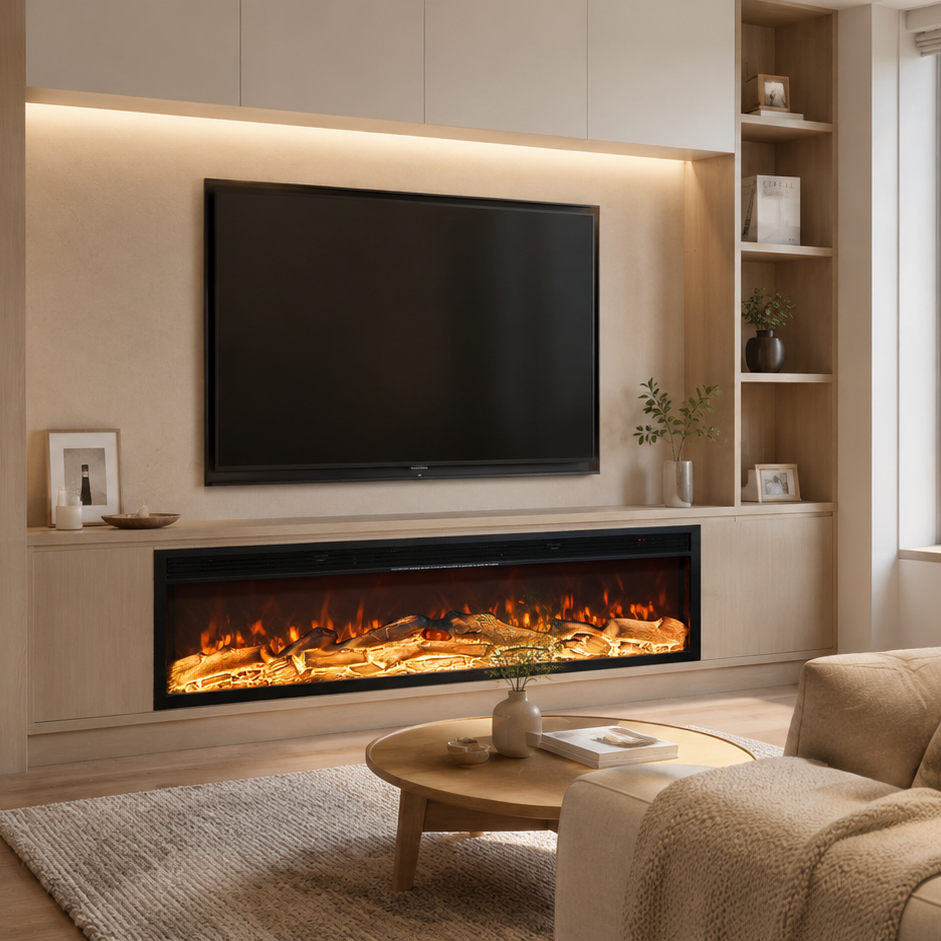
Linear Fireplace - 125cm
- Independent flame and heating modes
- Smart control(APP + Remote)
- Adjustable Flame
- Built-in Bluetooth speaker
-
Crackling fire sound
✔ 5-Year Warranty
✔ Local Service Support in Saudi Arabia


Lifelike Flame, Designed for Real Homes
Created using advanced Electric flame technology, the fireplace delivers depth, movement, and a natural glow that closely resembles a real fire.

Smart Control, the Way You Expect
Control flame effects, colors, and ambience easily through the mobile app.
Adjust the atmosphere instantly — including optional sound through the built-in Bluetooth speaker — without getting up or navigating complex settings.
Lifelike Flame, Designed for Real Homes
Created using advanced Electric flame technology, the fireplace delivers depth, movement, and a natural glow that closely resembles a real fire.
Smart Control, the Way You Expect
Control flame effects, colors, and ambience easily through the mobile app.
Adjust the atmosphere instantly — including optional sound through the built-in Bluetooth speaker — without getting up or navigating complex settings.


All Features
• Control via mobile app, remote, or onboard panel
• Adjustable flame colors and flame height
• Fine color customization through the App
• Built-in Bluetooth speaker for enhanced ambience
• Optional crackling fire sound with adjustable volume
• Child lock for added safety
What's in the box

Installation Guide
Control Panel & Remote Functions

Product specification
Saudi / UK Standard (Type G)
AC 220–240V, 50–60Hz
2 × AA (1.5V)
Iron, Plastic
After Service
→ Read Full Warranty Terms
30-Days Return
Shop with confidence: we accept returns within 30 days for unused, uninstalled products in their original packaging.
5-year warranty
Backed by a 5-year premium warranty with free spare parts and expert technical support across the Kingdom of Saudi Arabia.
Customer Service
Our team provides online installation and setup guidance via video calls or chat.
Saudi Arabia Customer Service: 9688-188-054
FAQs
Installation is very simple: slide the fireplace into your prepared cabinet/wall opening, keep a small top ventilation gap (about 1 cm), then plug it in and turn it on.
Important: If the wall socket is inside the opening, plug the unit in first, then slide the fireplace into place—make sure the cord is not pinched.
Before you start
Quick checklist
-
Cutout size: Opening dimensions vary by model. Check the Cutout Dimensions chart on your exact product page before cutting.
- Browse models here: /collections/linear-fireplace
- Top ventilation: Keep a ~1 cm gap at the top for airflow.
- Clear openings: Do not block any air inlet/outlet areas (especially the top vent).
- Power: Use a grounded wall socket. Make sure the voltage matches your model’s rating label.
- Placement: The cabinet/wall cavity should be level, stable, and strong enough to support the unit.
- Dry area: Keep the fireplace away from water sources.
Safety notes
- Do not install the unit in a fully sealed cavity—heat ventilation requires airflow.
- Keep power plugs and cables away from sharp edges and heat outlets.
- Avoid extension cords. If unavoidable, use a high-quality grounded extension cord.
Step-by-step installation
Step 1: Prepare the cabinet or wall opening
- Confirm the opening is square and the base is level.
- Verify your opening matches the Cutout Dimensions for your model (see the product page chart).
- Ensure there is a ~1 cm ventilation gap at the top (do not press the unit tightly against the top panel).
- Make sure no material blocks the top vent area.
Step 2: Connect power
- If the wall socket is inside the cavity, plug in the fireplace first before sliding it in.
- Route the cable so it won’t be pinched behind the unit.
Step 3: Position the fireplace
- Slide the fireplace into the opening gently.
- Keep the unit centered and stable.
- Do not pinch the power cable behind the unit.
Step 4: Test operation
- Turn on the flame effect first and confirm it displays normally.
- If your model has heating, test heat briefly and confirm warm air flows from the vent area.
- Listen for unusual noise and confirm there is no burning smell after initial start-up.
The heating temperature of the fireplace is not adjustable — it has a fixed heating output. You can turn the heater ON or OFF, but the temperature level itself cannot be changed.
Why temperature can’t be adjusted
EBLTH electric fireplaces are designed with a 1500W preset heating power for safety and simplicity.
This ensures:
- Stable performance and long lifespan
- Lower risk of overheating
- Easy operation (no complex temperature setting)
How to control heating
- Use the remote control to turn heating ON or OFF.
- You can also use the operation panel to control the heater manually.
- The flame effect and the heating function work independently — you can enjoy flame only, heat only, or both together.
If your heater sometimes shuts off, follow the steps below to identify the cause and restore normal operation.
Check what stopped first
Case A: Everything is off (flame/light + heater all stop)
- Try a different working wall socket.
- Turn off other high-power appliances on the same circuit (the breaker may trip and cut power to the whole fireplace).
- Make sure the plug is fully inserted and the main power switch is on.
Case B: Only the heater stops (flame/light stays on)
- Make sure vents are clear and the unit has enough ventilation space (Check installation requirements here).
- Let the unit cool down for 10–15 minutes, then restart the heater.
If it doesn’t work, it may be due to:
- Breaker keeps tripping (Case A): Use a different circuit/socket and avoid sharing the line with high-power appliances.
- Overheat protection (Case B): Clean dust from air inlets/outlets, improve airflow, and avoid placing the unit in a closed space.
- Auto temperature control (Case B): Some models pause the heater after reaching the set temperature and restart later. Increase the target temperature slightly and test again.
If heater still not working
Please send video to our support team:
- A short video showing the issue (include flame/light + heater status)
- A photo of the socket/plug setup
Use the download buttons on this page to install Smart Life on your phone.
Download the app

- iPhone / iPad: Tap here: Get it on App Store.
- Android: Tap here: Get it on Google Play.
If the download button doesn’t open the store
- Make sure your phone is connected to the internet (Wi-Fi or mobile data).
- Try opening this page in another browser (Safari / Chrome).
- Try QR code here:

If you can’t download Smart Life
iPhone / iPad (App Store)
- Open App Store and search Smart Life.
- Check your App Store region, then search again.
- Update iOS to the latest version available on your device, then try again.
Android (Google Play)
- Open Google Play and search Smart Life.
- Update Google Play and Google Play services, then try again.
- Free up storage space if your phone is low on space, then retry.
After you install the app
- Turn on Bluetooth.
- Turn on Location.
- Keep Wi-Fi.
- Continue to How to Connect the App to add your fireplace.
This guide shows you how to download the steam fireplace control app, connect it to your device, and set flame colors.
Download the app
Allow permissions and turn on required settings
During installation, tap Allow and Agree when prompted.
For a smooth connection, make sure these are turned on:
- Bluetooth
- Location
- Wi-Fi
Sign in and connect your device
- Sign up / in with your account.
- Enter the app and tap Continue.
- Wait while the app loads the device.
- When it finishes, tap Done.
Set flame colors in the app
After the connection is successful, you can control the fireplace from your phone:
- Manual color: Change the flame color to blue, red, or any custom color you like.
- Auto cycle: Enable automatic color cycling to display different colors in sequence.
If it doesn’t work
- Confirm Bluetooth, Location, and Internet are enabled.
- Move your phone closer to the fireplace, then try again.
- Close and reopen the app, then tap Continue again.
- Restart your fireplace and retry the connection.