
One of our customers recently asked a simple question:
"How can I adjust the flame brightness?"
The good news is that changing the flame brightness only takes a few seconds.
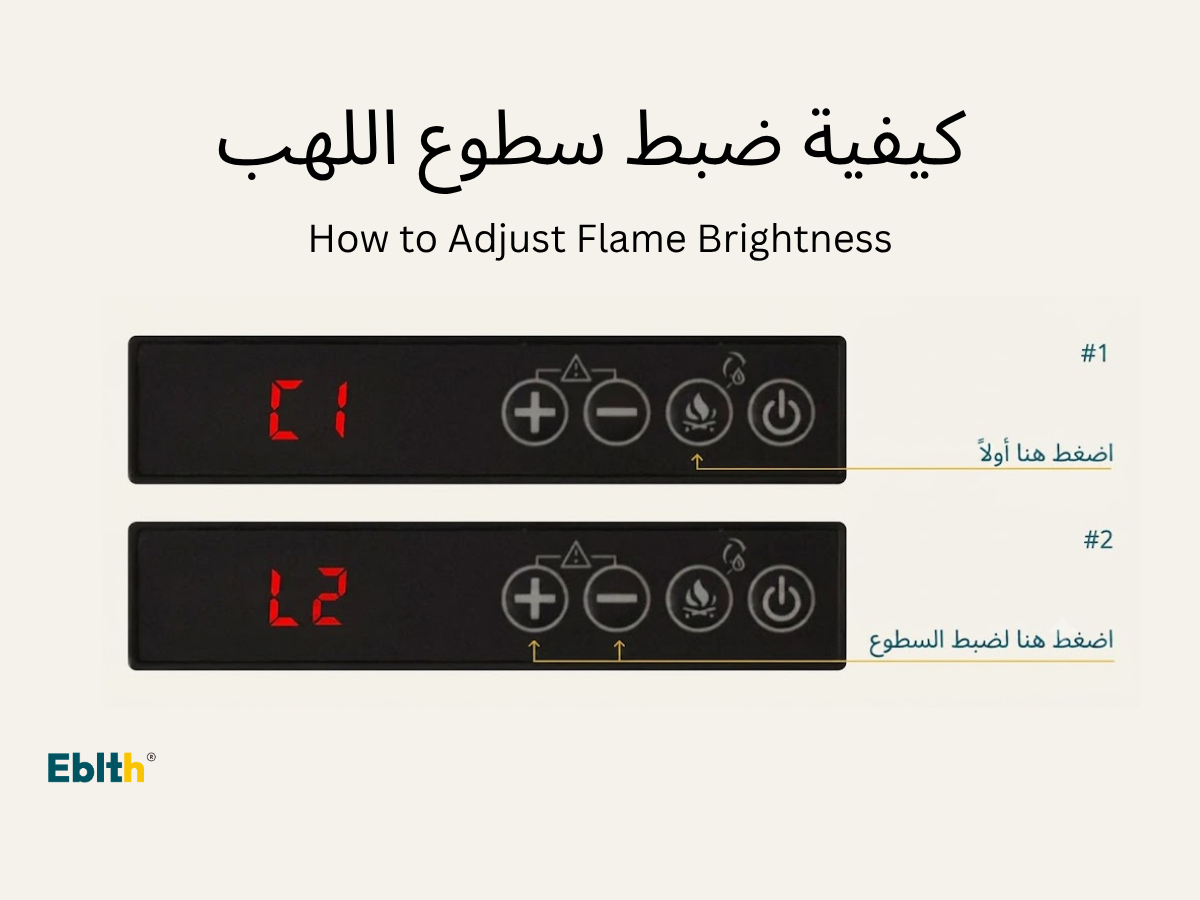
Step 1: Enter Brightness Adjustment Mode
Press the Flame Color button on the control panel.
The display will show the current brightness level.

Step 2: Adjust the Brightness
Press the + or − button to increase or decrease the flame brightness.
Brightness levels range from:
- L1 = Lowest brightness
- L5 = Highest brightness
Choose the level that best matches your room lighting and personal preference.

When Should You Use Different Brightness Levels?
Many customers prefer different brightness settings depending on the environment.
- L1–L2 creates a softer flame effect for bedrooms or evening relaxation.
- L3–L4 is suitable for most living rooms.
- L5 provides the brightest flame effect and works well in daylight or large spaces.
Need More Help?
If you need additional operating instructions, visit our Support Center for more step-by-step guides.
More Steam Fireplace Guides
You may also find these articles helpful:
